Customer Support
IPTV vs cable TV compared on yearly cost, channels, picture quality and reliability, plus the situations where cable is still the better choice.
The short answer
IPTV is usually far cheaper than cable and gives you more channels and a much bigger on-demand library, but it depends on your home internet, while cable does not. If your broadband is stable and you are comfortable using an app on a TV, streaming stick or phone, IPTV can replace a cable package for a fraction of the price. If your internet is slow, shared by many heavy users, or unreliable at peak times, cable is still the safer way to watch live TV.
That is the honest summary, and the rest of this guide explains the details behind it: what each option really costs over a year, how the two technologies deliver a picture to your screen, where each one is stronger, and how to make the switch without losing anything you care about. We are the support team behind IPTV USA, so we obviously have a view, but we will also be clear about the situations where cable remains the better call. A comparison that only ever picks one winner is not much use when you are the one paying the bill every month.
One definition before we start. In this guide, "cable" means a traditional pay-TV subscription delivered by a cable or satellite company, usually with a set-top box rented for each TV. "IPTV" means live channels and on-demand video delivered over your internet connection and watched in a player app. If you want the full background on the technology itself, read what IPTV is and how it works first and then come back here.
IPTV vs cable at a glance
Here is the side-by-side comparison most people are looking for. The figures for cable are national medians and typical terms, so your local provider may charge more or less. The figures for IPTV use the published IPTV USA plans for one connection.
| IPTV (IPTV USA) | Cable / satellite TV | |
|---|---|---|
| Typical cost per month | $4.58 to $11.99 | Median $125 (doxo, 2026) |
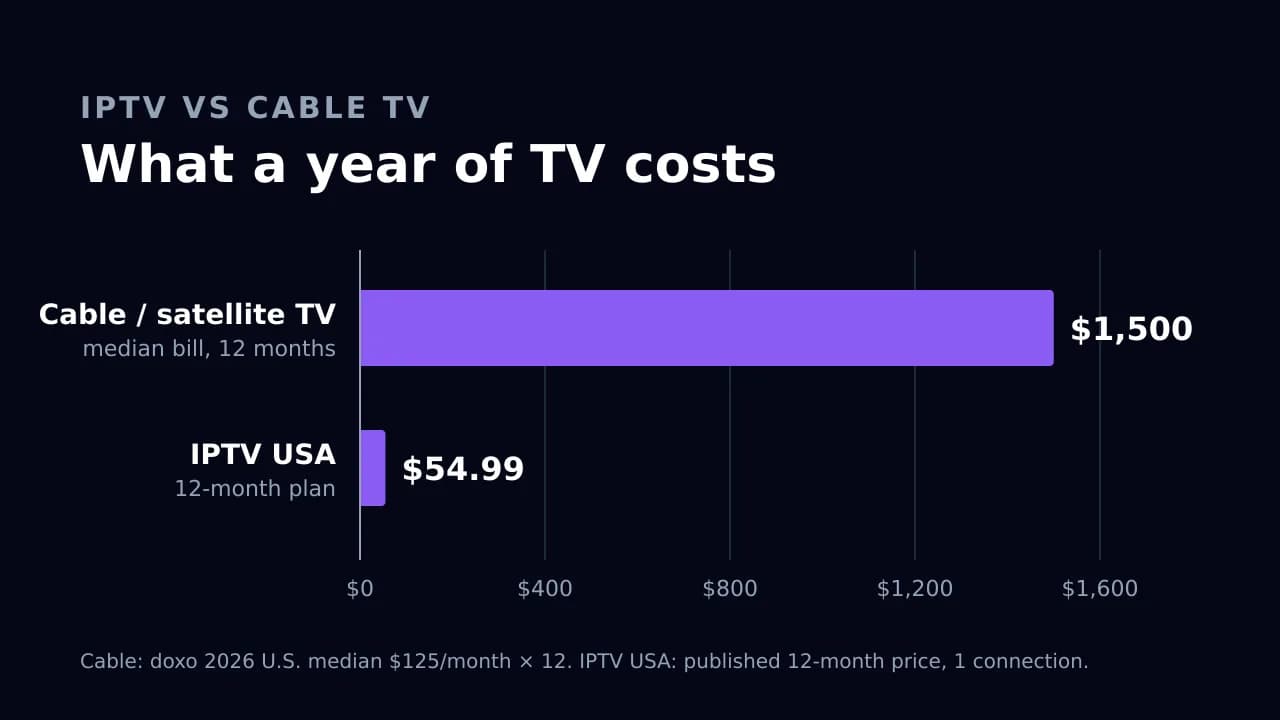
| Cost for 12 months | $54.99 on the 12-month plan | About $1,500 at the median |
| Contract | None, prepaid | Often 1 to 2 years |
| Equipment | Devices you already own | Rented set-top box per TV |
| Live channels | 24,000+ including international | Depends on your package |
| Movies and series on demand | 150,000+ titles | Limited, often paid extra |
| Needs home internet | Yes, about 10 Mbps per HD stream | No |
| Works away from home | Yes, on your own devices | Mostly no, or app-only extras |
| Free trial | 24 hours | Rarely |
The table hides one important nuance: IPTV only works well if your internet does. Cable arrives on its own line and keeps playing even when your broadband is having a bad evening. Keep that trade-off in mind as you read the rest of the comparison.
What a year of TV really costs
Monthly prices are easy to compare but they hide the real difference, which only becomes obvious over a full year. According to the 2026 doxo U.S. Cable and Satellite Report, households with cable or satellite pay a median of $125 a month, or about $1,500 a year, and in some cities the median annual bill is above $2,400. J.D. Power's analysis of early 2025 bills put the average unbundled cable or satellite TV bill at $121.86 a month, and the average TV and internet bundle at $187.99.
Here is what that looks like across a year, using those published figures and the published IPTV USA prices:
| Option | Monthly cost | 12-month cost | Difference vs cable median |
|---|---|---|---|
| Cable or satellite (doxo median) | $125.00 | $1,500.00 | — |
| Cable or satellite (J.D. Power unbundled average) | $121.86 | $1,462.32 | −$37.68 |
| IPTV USA, paid month by month | $11.99 | $143.88 | −$1,356.12 |
| IPTV USA, 12-month plan | $4.58 effective | $54.99 | −$1,445.01 |
The costs people forget
A fair comparison has to include the things that are not on the headline price. For cable, that usually means set-top box rental for each extra TV, regional sports or broadcast fees added to the bill, installation charges, and the early-termination fee if you cancel a contract before it ends. Those extras are why the doxo and J.D. Power numbers are higher than the advertised price of most cable packages.
For IPTV, the hidden cost is your internet connection. You need broadband to stream, but the vast majority of households already pay for it, so for most people IPTV adds no new line to the budget. If you currently pay for a TV and internet bundle, check what the internet-only price would be before you cancel the TV part; sometimes providers raise the internet price when the bundle discount disappears. Even then, the gap between roughly $1,500 a year for cable and $54.99 a year for a 12-month IPTV plan leaves plenty of room.
A worked example: a household with two TVs
Take a typical household with a TV in the living room and one in a bedroom, where two people sometimes watch different things at the same time. On cable, that usually means the base package plus a second set-top box, often with a monthly rental fee on top of the median bill. On IPTV, the same household needs a plan with two connections so both TVs can stream at once, and a home connection with enough headroom for two HD streams, roughly 20 Mbps on top of whatever else the house is doing online.
Two-connection pricing at IPTV USA is confirmed on WhatsApp when you order, so we will not quote a number here that is not on the plans page. The point is that the comparison scales in the same direction: cable adds equipment and fees per TV, while IPTV adds a second stream to a plan that starts at a small fraction of the cable price. Most two-TV households still save well over a thousand dollars a year.
Why the prices are so different
Cable companies pay networks carriage and retransmission fees for every channel they carry, maintain physical cable and satellite infrastructure, and rent equipment to every home. Those costs are built into the bill. Big-name live TV streaming apps pay the same kind of carriage fees, which is why their base plans commonly cost somewhere around $75 to $85 a month in 2026 rather than $10. Whatever service you choose, it is worth confirming that the provider is open about what it offers and how, and reading its terms of service and refund policy before you pay.
How each one delivers TV
The practical differences between IPTV and cable come from how the signal reaches your screen, so it helps to understand the basics.
Cable and satellite
Traditional cable sends every channel in your package down a coaxial or fiber line from the provider's head end to your home, all the time. Your set-top box simply tunes to the channel you pick. Satellite works the same way, except the signal comes from space to a dish on your roof. Because the channels are broadcast continuously on their own dedicated line or frequency, the picture does not depend on how busy your internet connection is. That is cable's biggest technical advantage.
IPTV
IPTV, short for Internet Protocol Television, sends video as data packets over your internet connection, the same way web pages and video calls travel. When you choose a channel in your player app, the app requests that stream and the provider sends it to you. Only the channel you are watching uses bandwidth, which is why a household can have access to tens of thousands of channels without needing a huge connection.
You watch IPTV in a player app on devices you already own: a Firestick, a Samsung or LG smart TV, an Android TV box, an Apple TV, an iPhone or iPad, or a computer. Most services give you access through an Xtream Codes login or an M3U playlist, which popular players such as IPTV Smarters Pro and TiviMate understand.
The trade-off is simple: IPTV removes the cable line, the box rental and the contract, but it hands responsibility for picture stability to your home network. The better your broadband and Wi-Fi, the closer IPTV feels to cable.
Channels and on-demand content
Cable packages are built in tiers. A basic tier covers local broadcast and a handful of popular networks, and each step up adds more entertainment, sports and premium movie channels for a higher monthly price. International and Spanish-language channels are often extra add-ons, and the on-demand library is usually limited to recent episodes of the channels you already pay for.
IPTV services tend to work the other way around. At IPTV USA, every plan includes the same catalog: more than 24,000 live channels organized into categories such as US entertainment, news, sports, kids, documentaries, Spanish-language and international programming, plus more than 150,000 movies and series on demand. You do not choose between a sports tier and a movie tier; the only differences between plans are how long they last and how many screens can watch at once.
What to check before you switch
A big channel number is only useful if the channels you actually watch are there and work well. Before you cancel cable, make a short list of your must-watch channels and check them during a trial:
- Your local news and any regional sports network you follow
- The three to five entertainment channels you watch most often
- Any international or Spanish-language channels your household relies on
- Two or three movies or series you want to watch on demand
- Kids' channels, if you have children at home
Browse the channel categories to see how the lineup is organized, and use the free trial to check your specific list on your own TV. If you are a heavy sports viewer, our guide to IPTV for sports covers what to test during live events, and viewers who want programming from home can read about international channels on IPTV.
Picture quality and reliability
This is where the honest comparison matters most, because it is the area where cable still has a genuine edge.
Picture quality
Both cable and IPTV can deliver sharp pictures. Cable typically carries channels in HD, with a limited number of 4K channels and events. IPTV streams in HD, Full HD and 4K where the source provides it. On a good connection, a well-encoded IPTV stream looks as good as cable, and 4K content is often easier to find on IPTV because the on-demand library is so much larger.
Streaming quality depends on bandwidth. The FCC's Broadband Speed Guide lists about 5 to 8 Mbps for streaming HD video and 25 Mbps for 4K. We recommend planning for around 10 Mbps per HD stream to leave some headroom, and 25 Mbps for each 4K stream. If two people will watch different channels at the same time, add those numbers together. Our IPTV internet speed guide explains how to test your connection properly.
Reliability
Cable's advantage is independence from your broadband. A cable box keeps working when someone in the house starts a large download, when your Wi-Fi is congested, or when your internet provider has a busy evening. IPTV depends on all of those things. Most IPTV problems people describe as "buffering" are really home-network problems: a TV at the edge of Wi-Fi range, a crowded 2.4 GHz band, or too many devices competing for bandwidth at the same moment.
The good news is that these problems are usually fixable. Connecting the main TV with an Ethernet cable, or moving it to 5 GHz Wi-Fi, solves most stability issues; our comparison of Wi-Fi vs Ethernet for streaming walks through when each makes sense. If a stream still stutters, work through the IPTV buffering fix guide before you judge the service.
Live sports and big events
Live sport is the hardest test for any streaming service. Everyone tunes in at the same moment, the action is fast, and a few seconds of delay can mean hearing a neighbour cheer before you see the goal. Cable channels usually run slightly ahead of internet streams, because streaming adds encoding and buffering steps. If watching in perfect sync with friends or live betting matters to you, keep that in mind. For everyone else, the practical advice is the same as for any IPTV viewing: wire the main TV if you can, avoid big downloads during the match, and test a live event during your trial rather than a quiet weekday show.
We will not pretend IPTV is buffer-free. No internet-based service can guarantee that, and anyone who promises zero buffering or 100% uptime is overselling. What you can expect on a solid connection is a stable picture most of the time, with occasional hiccups during unusually busy moments such as major live sports events.
Equipment, contracts and fees
Cable is built around hardware and commitments. Each TV usually needs its own set-top box, rented monthly. Installation may require a technician visit. Many packages come with a one- or two-year contract, promotional prices that rise after the first year, and an early-termination fee if you leave early. Moving house often means scheduling new installation or returning equipment.
IPTV removes most of that. You install a player app on a device you already own, enter your login details, and start watching. IPTV USA plans are prepaid for 1, 3, 6 or 12 months with no contract, and they never renew automatically; when the paid period ends, access simply stops unless you choose to renew. Orders are confirmed over WhatsApp, so no card details are entered on the website. If you want more than one screen to play different channels at the same time, you choose a plan with two connections.
There are a few things IPTV does not do the way cable does. There is no technician to install anything, so you set up the app yourself using a device setup guide. Cloud DVR and recording features depend on the player app you choose, rather than a box the provider supplies. And if your internet goes down, your TV goes with it. For most households these are fair trades for the savings, but they are worth knowing before you cancel.
When cable is still the better choice
A comparison written by an IPTV service should still tell you when not to switch. Cable or satellite remains the better choice in these situations:
- Your internet is slow or unreliable. If your connection regularly drops below 10 Mbps, or stalls in the evening, IPTV will be frustrating. Fix the internet first or keep cable.
- Your internet has a strict data cap. HD streaming uses several gigabytes an hour. If your plan caps monthly data, heavy TV watching could push you over the limit.
- Someone at home needs zero learning curve. Cable's remote and channel numbers are familiar. IPTV apps are easy, but they are still apps, with menus and logins.
- You depend on a feature your provider bundles. Some cable packages include a provider-managed DVR, specific regional sports rights, or equipment you rely on. Check you can replace those before cancelling.
- Many people stream at once on a modest connection. A large household running several 4K streams, video calls and game downloads on a small plan may hit the limit where cable's separate line is an advantage.
If none of those apply, IPTV is very likely to save you money without giving up the channels you watch. If one or two apply, you can often solve them, for example by upgrading your internet plan with part of what you save on cable, or wiring the main TV with Ethernet. And if you are unsure, test first. A trial on your own TV, at the times you normally watch, answers the question better than any comparison table can.
How to switch from cable to IPTV
Switching is straightforward if you do it in the right order, so that you never end up with no TV at all.
- Test your internet first. Run a speed test on the TV you watch most, in the evening. Aim for at least 10 Mbps per HD stream and 25 Mbps per 4K stream.
- Start a free trial before cancelling anything. Request the 24-hour free trial and follow the setup guide for your device.
- Check your must-watch list. Open your key channels at peak hours, try live sports, check the program guide and play a few on-demand titles.
- Fix any Wi-Fi weak spots. If a stream stutters, move the TV to 5 GHz Wi-Fi or connect it with Ethernet, then test again.
- Choose a plan. Pick a duration and the number of connections your household needs on the plans page. Start with a shorter plan if you want more time to be sure.
- Review your cable contract. Check for early-termination fees, equipment you must return, and whether your internet price changes without the TV bundle.
- Cancel cable and return the equipment. Keep the receipt for any returned boxes so they are not charged to your account later.
Once you are set up, the IPTV not working guide and the buffering fix guide cover the most common questions, and our support team is available on WhatsApp if you get stuck.
The bottom line
For most US households with decent broadband, IPTV costs a small fraction of cable, offers far more channels and on-demand content, and removes contracts and rented boxes. Cable still wins on independence from your internet connection and on simplicity for people who do not want to use apps. The smart way to decide is not to take anyone's word for it, including ours: test IPTV on your own TV, at the times you actually watch, and compare what you see with what you pay for cable today. You can compare IPTV plans or start a free 24-hour trial whenever you are ready.
Frequently asked questions
Is IPTV cheaper than cable?
Usually, yes. The 2026 doxo report puts the median US cable or satellite bill at $125 a month, about $1,500 a year. An IPTV USA 12-month plan costs $54.99, or $11.99 if you pay month by month. You do need a home internet connection, which most households already have.
Is IPTV as reliable as cable?
Not quite. Cable arrives on its own line and does not depend on your internet. IPTV depends on your broadband and Wi-Fi, so a stable connection matters. Most stability problems can be fixed by using Ethernet or 5 GHz Wi-Fi for the main TV.
What internet speed do I need to replace cable with IPTV?
The FCC lists about 5 to 8 Mbps for HD streaming and 25 Mbps for 4K. We recommend planning for around 10 Mbps per HD stream and 25 Mbps per 4K stream, and adding them together if several TVs watch at once.
Do I need a cable box for IPTV?
No. IPTV runs in a player app on devices you already own, such as a Firestick, a Samsung or LG smart TV, an Android TV box, an Apple TV, a phone or a computer.
Can I keep my internet if I cancel cable TV?
In most cases, yes. Ask your provider for the internet-only price before cancelling, because some bundles raise the internet price when the TV discount is removed.
Should I cancel cable before trying IPTV?
No. Start a free trial first, test your must-watch channels at peak hours on your own TV, and only cancel cable once you are happy with the picture and the channel lineup.
Sources
Tags
- IPTV vs cable
- Cord cutting
- Cable TV
- Pricing
- Live TV
- Streaming